error 00061
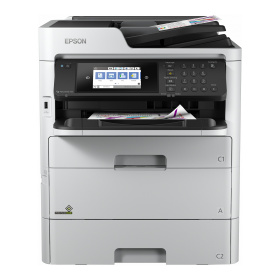
Frage zum Epson Workforce Pro WF-C579RDTWF: Multifunktionsdrucker (Pigmenttinte) mit Kopie, Scan, Fax, Farbe, 24,0 ipm, 30,0 ppm (ADF-Scan), 60,0 ipm (ADF-Duplex-Scan), PCL/PS/PDF, kein Randlosdruck, Ethernet, Wlan, Duplexdruck, Dual-Duplex-ADF (50 Blatt), 3 Zuführungen (830 Blatt), Touch-Display (10,9 cm), kompatibel mit T01C1, T01C2, T01C3, T01C4, T01D1, T01D2, T01D3, T01D4, T6716, 2018er Modell
Passend dazu Epson T01D1

00061 = "ASF PID excess load error"
That probably indicates a scanner error. Have you checked to see if there's anything stuck in the ADF? Did too many originals misfeed before?
Does the error come right after the strt? Then the self-test fails
do you still have warranty This is already a high-quality device for a high volume of printing and scanning.
Gruß,
Ronny Budzinske
www.druckerchannel.de
Cause:
State in which driven at unexpected speed (fast) for control.
Suspected cause:
ASF gear train part damaged
ASF motor failure
Main Board Assy failure (Motor driver failure)
Jammed paper or foreign object remaining
Paper path damaged and conveyance roller worn out
ASF encoder failure
– STEP 1: Check the ASF gear train parts
Check that an ASF gear train part has not dropped off or become detached.
Is the result OK?
Yes? – Replace the following parts in sequence.
• ASF Motor Assy
• Main Board Assy
(If the trouble is not resolved after replacing the parts shown above, inquire at Epson Service Support department.)
No?
– When dropped off Reassemble the ASF gear train parts.
– When damaged Replace the ASF Motor Assy.
– STEP 2: Check the paper feed path state
Check the paper feed path state as follows.
• Is there any jammed paper or foreign object remaining in the paper feed path?
Is the result OK?
Yes? – Go to step 2
No? – Remove the jammed paper and foreign object.
– STEP 3: Check the feed roller and the conveyance roller state
Check that a feed roller and a conveyance roller are not damaged or worn out.
Is the result OK?
Yes? – Go to step 3
No? – Replace the feed roller or replace the Rear Unit.
– STEP 4: Check the ASF motor operation_1
Turn on the power and check the ASF motor operation.
Did the ASF motor operate (rotate)?
Yes? – Go to step 4
No? – Go to step 5
– STEP 5: Check the ASF motor operation_2
Is the ASF motor operating normally?
Yes? – Replace the Main Board Assy.
(If the trouble is not resolved after replacing the Main Board Assy, inquire at Epson Service Support department.)
No? – Replace the ASF encoder.
– STEP 6: Check the ASF gear train parts
Check if a foreign object impedes rotation or the ASF drive gears are damaged.
Is the result OK?
Yes? – Replace the ASF Motor Assy.
(If the trouble is not resolved after replacing the ASF motor assy, replace the Main Board Assy.)
No? – Remove the foreign object or replace the ASF Motor Assy.
1
Offenlegung - Provisionslinks
Wir erhalten bei einer Vermittlung zum Kauf oder direkt beim Klick eine Provision vom Anbieter.
Alle Preise enthalten die derzeit gültige MwSt. und verstehen sich zzgl. Versandkosten. Der Preis sowie die Verfügbarkeit können sich mittlerweile geändert haben. Weiß hinterlegte Preise gelten für ein baugleiches Gerät. Alle Angaben ohne Gewähr.
| 23:58 | AW #4: Kein Schwarzdruckjo-ker |
| 23:37 | ?AW #49: DC lädt langsam?budze |
| 21:48 | |
| 20:58 | |
| 19:11 | |
| 18:51 |
✉
„Kein Papier“
MBausB
|
| 23.4. |
✉
Farbe druckt versetzt
EEr
|
Neu |
Multifunktionsdrucker, A3 (Laser/LED) |
| Neu |
Lexmark CX943adtse
Multifunktionsdrucker, A3 (Laser/LED) |
| Neu |
Lexmark CX943adxse
Multifunktionsdrucker, A3 (Laser/LED) |
| Neu |
Multifunktionsdrucker (Laser/LED) |
 |
Multifunktionsdrucker (Tinte) |
 |
Multifunktionsdrucker (Tinte) |
 |
Multifunktionsdrucker (Pigmenttinte) |
 |
Multifunktionsdrucker (Pigmenttinte) |
 |
Multifunktionsdrucker, A3 (Tinte) |
 |
Multifunktionsdrucker (Tinte) |