1. DC
  2. Tests & Artikel
  3. Workshops
  4. Resttintenbehälter
  5. Workshop: How to replace waste ink sponges of Canon S- & i-models
deen

Workshop How to replace waste ink sponges of Canon S- & i-models: Step 2: Removing the power supply

von Frank Frommerübersetzt von Ulrich Junker
Angebote werden geladen...

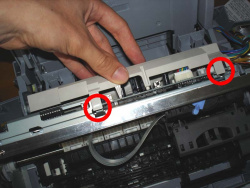
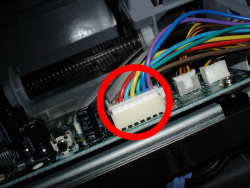
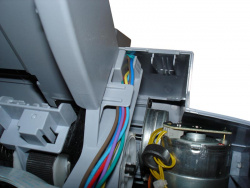
To remove the print engine you have to unplug the power supply´s jack from the mainboard.

Canon´s S750 has a grey cover, which is mounted by clips.
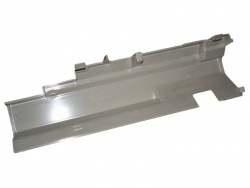
After unplugging the jack (picture bottom left) you can remove the printer´s body.

Dieser Artikel wurde ohne generative KI erstellt.
12.02.10 10:49 (letzte Änderung)
1Diaper change: Canon S- and i-models
2Important: Loss of warranty and your own liability
3What´s a waste ink collector good for?
4Lifetime of a waste ink collector
5How to replace sponges
6Step 1: Open the printer
7Step 2: Removing the power supply
8Step 3: Lift the print engine
9Step 4: Reassembly
10Step 5: Reset the counter

9 Wertungen

 
1

Offenlegung - Provisionslinks

Wir erhalten bei einer Vermittlung zum Kauf oder direkt beim Klick eine Provision vom Anbieter.

Alle Preise enthalten die derzeit gültige MwSt. und verstehen sich zzgl. Versandkosten. Der Preis sowie die Verfügbarkeit können sich mittlerweile geändert haben. Weiß hinterlegte Preise gelten für ein baugleiches Gerät. Alle Angaben ohne Gewähr.

Forum Aktuell
12:12
10:42
10:10
06:59
10:15
Artikel
15.07. Drucker unter Windows 11: "Windows Ready Print" wird ab sofort priorisiert
10.07. Xerox B110, B105 und B115: Einfachste Monolaser mit Samsung-​Technik
09.07. ReadyPrint Flex: Epson prüft die Einführung neuer Tintenabos mit mehr Flexibilität und ohne Fixkosten
06.07. HP-​Verbrauchsmaterialien: Maßnahmen und Erfolge gegen Drittanbieter von Tinten-​ und Tonerkartuschen
01.07. Epson und "Windows Ready Print": Epson steht (zunächst) ohne Druckunterstützungs-​App da
30.06. Druckunterstützungs-​Apps (PSA) für "Windows Ready Print": Alles so schön bunt hier!
25.06. Ricoh ScanSnap Home: Softwareupdate für "ScanSnap Home" und Hardware-​OCR beim iX2500 freigeschaltet
23.06. Canon i-​Sensys MF275dw II, MF272dw II & LBP122dw II: Behutsames Facelift für die Monolaser-​Kompaktklasse
22.06. Xerox C200-​ und C300-​Serie (2026): Kombinierte Farblaser-​Einstiegsklasse von Lexmark und Xerox
16.06. Shrinkflation: Tintenpatronen-​Overkill
15.06. HP 302/304: Zusammenlegung geht bei 302er Tintenpatronen auf Kosten von Reichweite und Seitenpreis
12.06. Brother × Ricoh: "Strategische Allianz" ist nun auch in Europa angekommen
Beliebte Drucker
ab 598,49 €1 Epson Ecotank ET-8550

Multifunktionsdrucker, A3 (Tinte)

ab 149,99 €1 Canon Maxify MB5150

Multifunktionsdrucker (Pigmenttinte)

ab 352,96 €1 Epson Ecotank ET-4950

Multifunktionsdrucker (Tinte)

ab 680,00 €1 Epson Ecotank ET-5805

Multifunktionsdrucker (Pigmenttinte)

ab 322,98 €1 Epson Ecotank ET-3950

Multifunktionsdrucker (Tinte)

ab 329,00 €1 Canon Maxify GX4050

Multifunktionsdrucker (Pigmenttinte)

ab 71,38 €1 Canon Pixma TS705a

Drucker (Tinte)

ab 386,90 €1 Canon i-Sensys MF752Cdw II

Multifunktionsdrucker (Laser/LED)

ab 369,00 €1 HP Color Laserjet Pro MFP 3302fdwg

Multifunktionsdrucker (Laser/LED)

ab 295,76 €1 Brother MFC-J5010DW

Multifunktionsdrucker (Pigmenttinte)

Merkliste

×
Drucker vergleichen