1. DC
  2. Tests & Artikel
  3. Workshops
  4. Resttintenbehälter
  5. Workshop: Change Waste-Ink-Tank Canon Pixma iP4000
deen

Workshop Change Waste-Ink-Tank Canon Pixma iP4000: Step 1: Removing the printer´s sides

von Frank Frommerübersetzt von Ulrich Junker
Angebote werden geladen...
Hinweis: Für mindestens einen erwähnten Drucker ist der ausführliche Testbericht "Neuer Stern am Druckerhimmel" sowie "Allrounder mit guter Ausstattung" sowie "Canons größter" sowie "Konkurrenz für Sechsfarbdrucker" sowie "Vielseitiger Fotodrucker" verfügbar.

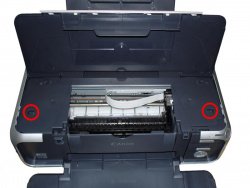
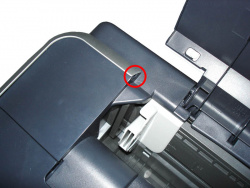
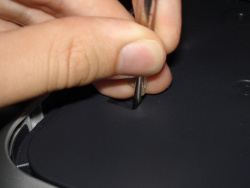
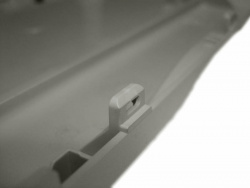
You begin with removing both sides. To achieve that, take a plain screwdriver and carefully press it into the places marked on the pictures below.

The sides are attached to the bottom and can easily be removed after opening the two clips.
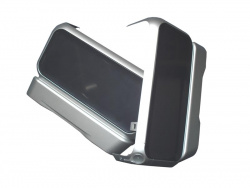
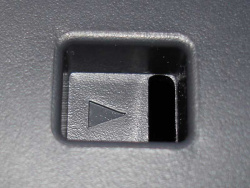
After removing the right side you see three cogwheels. They have nothing to do with our exchange procedure, to know their properties could come handy when you have a different problem: Turning them by hand opens the print head-lock.

Dieser Artikel wurde ohne generative KI erstellt.
26.03.07 16:14 (letzte Änderung)
1Panic - "Waste ink tank full"
2Important: Loss of warranty and your own liability
3What´s a waste ink collector good for?
4Lifetime of a waste ink collector
5How to exchange sponges
6Step 1: Removing the printer´s sides
7Step 2: Removing the printer´s top
8Step 3: Removing the power supply
9Step 4: Lift the print engine
10Step 5: Reassembly
11Step 6: Reset the counter
Technische Daten

79 Wertungen

 
1

Offenlegung - Provisionslinks

Wir erhalten bei einer Vermittlung zum Kauf oder direkt beim Klick eine Provision vom Anbieter.

Alle Preise enthalten die derzeit gültige MwSt. und verstehen sich zzgl. Versandkosten. Der Preis sowie die Verfügbarkeit können sich mittlerweile geändert haben. Weiß hinterlegte Preise gelten für ein baugleiches Gerät. Alle Angaben ohne Gewähr.

Forum Aktuell
20:49
18:29
11:31
10:10
23:44
Artikel
05.08. Xerox Bilanz FQ2/2026: Trendumkehr nach Lexmark-​Integration
30.07. Brother MFC-​J5110DW, MFC-​J5010DW und MFC-​J5013DW: Besser ausgestattet und kompakter dank vollem Fokus auf A4
28.07. HP Smart Tank 6006 sowie 5109, 5115 und 7315: Zuwachs bei "Smart Tank"-​Druckern und neue Gehäusefarben
27.07. HP Drucker Cashback 2026: Bis zu 50 Euro zurück für den Kauf eines ausgewählten HP-​Tintendruckers
22.07. Ricoh SP-​2230N und SP-​2240N: Dokumentenscanner mit "DirectScan" samt OCR
16.07. Avision AD136N: Günstiger Dokumentenscanner mit Flachbett
15.07. Drucker unter Windows 11: "Windows Ready Print" wird ab sofort priorisiert
10.07. Xerox B110, B105 und B115: Einfachste Monolaser mit Samsung-​Technik
09.07. ReadyPrint Flex: Epson prüft die Einführung neuer Tintenabos mit mehr Flexibilität und ohne Fixkosten
06.07. HP-​Verbrauchsmaterialien: Maßnahmen und Erfolge gegen Drittanbieter von Tinten-​ und Tonerkartuschen
01.07. Epson und "Windows Ready Print": Epson steht (zunächst) ohne Druckunterstützungs-​App da
30.06. Druckunterstützungs-​Apps (PSA) für "Windows Ready Print": Alles so schön bunt hier!
Beliebte Drucker
ab 355,91 €1 Epson Ecotank ET-4950

Multifunktionsdrucker (Tinte)

ab 579,90 €1 Epson Ecotank ET-8550

Multifunktionsdrucker, A3 (Tinte)

ab 286,78 €1 Brother MFC-J5010DW

Multifunktionsdrucker (Pigmenttinte)

ab 382,78 €1 Kyocera Ecosys MA2600cwfx

Multifunktionsdrucker (Laser/LED)

  Epson Workforce WF-3640DTWF

Multifunktionsdrucker (Pigmenttinte)

ab 346,17 €1 Canon i-Sensys MF667Cdw

Multifunktionsdrucker (Laser/LED)

ab 366,00 €1 Epson Ecotank ET-4956

Multifunktionsdrucker (Tinte)

ab 167,89 €1 Canon Maxify MB5150

Multifunktionsdrucker (Pigmenttinte)

ab 576,84 €1 Canon Maxify GX7150

Multifunktionsdrucker (Pigmenttinte)

ab 329,99 €1 Canon Maxify GX4050

Multifunktionsdrucker (Pigmenttinte)

Merkliste

×
Drucker vergleichen