1. DC
  2. Tests & Artikel
  3. Workshops
  4. Refill
  5. Refill Canon Pixma CLI-8 und PGI-5-Cartridges
deen

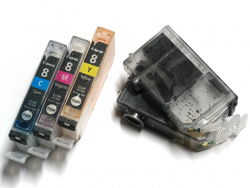
Refill Canon Pixma CLI-8 und PGI-5-Cartridges: How to refill Canon CLI-8- and PGI-5-cartridges

von Frank Frommerübersetzt von Ulrich Junker
Seite

Epson has been using chipped cartridges for some time, Canon started this by putting the Canon Pixma iP4200 and the Canon Pixma iP5200 on the road.

Compatible (and cheaper) cartridges with a chip haven´t been seen on the market so far.

If you want to save a lot of money, you better start refilling your cartridges yourself.

In this workshop you will find a new method of refilling by filling ink straight into the ink-chamber, instead of using a previously described technique (Normal Filling).

New technique

Start with drilling a hole in the rear part of the cartridge. Use a long cannula, puncture the ink-sponge, and direct the tip of the cannula into the ink-chamber.

This method has several advantages:

  • You don´t have to seal the cartridge afterwards
  • The drilling-hole needn´t be closed after refilling
  • Works even when the ink-sponge is empty

You can apply this technique to earlier versions of Canon´s Single-Ink-Cartridges (BCI-3, BCI-5, BCI-6) as well.

We are gratefull to our readers gurl and ritchman for their valuable contributions in our forum relating to Refill.

Further informations on refilling

Compatible printers for this refill workshop

Dieser Artikel wurde ohne generative KI erstellt.
11.01.10 17:22 (letzte Änderung)
1How to refill Canon CLI-8- and PGI-5-cartridges
2What you need for refilling
3Inner life of a cartridge
4Step 1: Open the cartridge
5Step 2: Insert the cannula
6Step 3: Injecting the ink
7Step 4: Outsmart the printer
8A cartrige´s lifetime

60 Wertungen

 
1

Offenlegung - Provisionslinks

Wir erhalten bei einer Vermittlung zum Kauf oder direkt beim Klick eine Provision vom Anbieter.

Alle Preise enthalten die derzeit gültige MwSt. und verstehen sich zzgl. Versandkosten. Der Preis sowie die Verfügbarkeit können sich mittlerweile geändert haben. Weiß hinterlegte Preise gelten für ein baugleiches Gerät. Alle Angaben ohne Gewähr.

Forum Aktuell
00:59
23:25
23:07
19:10
19:01
18.1.
Artikel
16.01. Epson "ReadyPrint MAX" mit Ecotank ET-​4950U: Selbst kaufen oder besser im Vollservice-​Abo?
13.01. Epson Expression Photo XP-​980: Multifunktions-​Fotodrucker mit A3-​Bypass
08.01. HP für Microsoft 365 Copilot: Umfassende KI-​Erweiterung für professionelle HP-​Multifunktionsdrucker
06.01. Canon Imageformula DR-​C350 und DR-​C340: Solide Dokumentenscanner-​Kompaktklasse
05.01. HP Smart Tank Cashback 2026: 20, 30 oder 50 Euro zurück für den Kauf eines HP Smart Tank
29.12. Epson und oAuth 2.0: Aktualisierung für aktuelle Workforce-​ und Ecotank-​Bürotintendrucker und Scanner
29.12. Xerox Dundalk: Irisches Werk für Tonerkartuschen schließt
15.12. Brother MFC-​J6000DW-​Serie 2026: Neue Bürotintendrucker bekommen doppelte Reichweite
11.12. Brother-​Tonerkartuschen: Erfolgreiche Klage gegen Fälschernetzwerk
10.12. Ricoh IM Cxx01CE-​Serie: Aufbereitete A3-​Farbkopierer
03.12. Canon Zhongshan: Canon schließt chinesisches Werk für Laserdrucker
20.11. Ricoh Scansnap iX2400: Flinker USB-​Dokumentenscanner mit eng verzahntem Softwarepaket
Themen des Tages
Beliebte Drucker
Neu ab 178,89 €1 Brother Cube Pro PT-E720BT

Spezialdrucker

Neu ab 424,00 €1 Brother ADS-4550W

Dokumentenscanner

ab 397,99 €1 Kyocera Ecosys MA2600cwfx

Multifunktionsdrucker (Laser/LED)

ab 382,99 €1 Epson Ecotank ET-4950

Multifunktionsdrucker (Tinte)

ab 903,90 €1 Epson Ecotank ET-5850

Multifunktionsdrucker (Pigmenttinte)

ab 155,80 €1 Canon Maxify MB5150

Multifunktionsdrucker (Pigmenttinte)

ab 355,99 €1 Epson Ecotank ET-3950

Multifunktionsdrucker (Tinte)

ab 303,99 €1 Canon Maxify GX4050

Multifunktionsdrucker (Pigmenttinte)

ab 552,43 €1 Canon Maxify GX7050

Multifunktionsdrucker (Pigmenttinte)

ab 186,99 €1 Epson Ecotank ET-2870

Multifunktionsdrucker (Tinte)

Merkliste

×
Drucker vergleichen