1. DC
  2. Tests & Artikel
  3. Workshops
  4. Refill
  5. Refill Canon Pixma CLI-8 und PGI-5-Cartridges
deen

Refill Canon Pixma CLI-8 und PGI-5-Cartridges: Step 2: Insert the cannula

von Frank Frommerübersetzt von Ulrich Junker
Angebote werden geladen...

Now take the cannula and insert it into the hole you just drilled. Guide it as straight as possible along the bottom of the cartridge, right through the sponge.
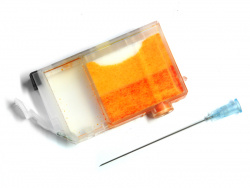
What you are aiming for is the hollow chamber of the cartridge. The two chambers are connected by a small opening, and that´s what you are trying to hit.

Once inside, you can see the end of the cannula inside the ink-chamber.

Dieser Artikel wurde ohne generative KI erstellt.
26.03.07 15:36 (letzte Änderung)
1How to refill Canon CLI-8- and PGI-5-cartridges
2What you need for refilling
3Inner life of a cartridge
4Step 1: Open the cartridge
5Step 2: Insert the cannula
6Step 3: Injecting the ink
7Step 4: Outsmart the printer
8A cartrige´s lifetime

60 Wertungen

 
1

Offenlegung - Provisionslinks

Wir erhalten bei einer Vermittlung zum Kauf oder direkt beim Klick eine Provision vom Anbieter.

Alle Preise enthalten die derzeit gültige MwSt. und verstehen sich zzgl. Versandkosten. Der Preis sowie die Verfügbarkeit können sich mittlerweile geändert haben. Weiß hinterlegte Preise gelten für ein baugleiches Gerät. Alle Angaben ohne Gewähr.

Forum Aktuell
17:16
16:27
13:42
10:43
10:10
Artikel
05.08. Xerox Bilanz FQ2/2026: Trendumkehr nach Lexmark-​Integration
30.07. Brother MFC-​J5110DW, MFC-​J5010DW und MFC-​J5013DW: Besser ausgestattet und kompakter dank vollem Fokus auf A4
28.07. HP Smart Tank 6006 sowie 5109, 5115 und 7315: Zuwachs bei "Smart Tank"-​Druckern und neue Gehäusefarben
27.07. HP Drucker Cashback 2026: Bis zu 50 Euro zurück für den Kauf eines ausgewählten HP-​Tintendruckers
22.07. Ricoh SP-​2230N und SP-​2240N: Dokumentenscanner mit "DirectScan" samt OCR
16.07. Avision AD136N: Günstiger Dokumentenscanner mit Flachbett
15.07. Drucker unter Windows 11: "Windows Ready Print" wird ab sofort priorisiert
10.07. Xerox B110, B105 und B115: Einfachste Monolaser mit Samsung-​Technik
09.07. ReadyPrint Flex: Epson prüft die Einführung neuer Tintenabos mit mehr Flexibilität und ohne Fixkosten
06.07. HP-​Verbrauchsmaterialien: Maßnahmen und Erfolge gegen Drittanbieter von Tinten-​ und Tonerkartuschen
01.07. Epson und "Windows Ready Print": Epson steht (zunächst) ohne Druckunterstützungs-​App da
30.06. Druckunterstützungs-​Apps (PSA) für "Windows Ready Print": Alles so schön bunt hier!
Beliebte Drucker
ab 312,00 €1 Epson Ecotank ET-3950

Multifunktionsdrucker (Tinte)

ab 284,71 €1 Brother MFC-L2860DWE

S/W-Multifunktionsdrucker (Laser/LED)

ab 343,99 €1 Epson Ecotank ET-4950

Multifunktionsdrucker (Tinte)

ab 167,89 €1 Canon Maxify MB5150

Multifunktionsdrucker (Pigmenttinte)

ab 346,17 €1 Canon i-Sensys MF667Cdw

Multifunktionsdrucker (Laser/LED)

ab 329,99 €1 Canon Maxify GX4050

Multifunktionsdrucker (Pigmenttinte)

ab 286,78 €1 Brother MFC-J5010DW

Multifunktionsdrucker (Pigmenttinte)

ab 99,90 €1 Canon Pixma TS7750i

Multifunktionsdrucker (Tinte)

ab 413,90 €1 Canon i-Sensys MF752Cdw II

Multifunktionsdrucker (Laser/LED)

ab 335,80 €1 HP Color Laserjet Pro MFP 3302fdwg

Multifunktionsdrucker (Laser/LED)

Merkliste

×
Drucker vergleichen