1. DC
  2. Tests & Artikel
  3. Laserdrucker
  4. Farblaser
  5. Drucker
  6. Comparative Test: Color Lasers up to 700 Euros
deen

Comparative Test Color Lasers up to 700 Euros: Ergonomics: Use of the menu

von Florian Heiseübersetzt von Ulrich Junker
Angebote werden geladen...

An illuminated display shows information far better than a normal LC-display. Only Brother and Kyocera offer that comfort. To read the display on the HP, Oki, or Samsung, you have to take a very close look. The Oki´s is by far too small and of little use.

We test, whether or not one can read the display sitting in a wheelchair. Samsung´s and Kyocera´s displays look upward, they are barely readable. The Brother´s display is hinged and can be adjusted in an optimal way. Although they are small, Oki´s and HP´s displays can be read from a wheelchair.


Brother HL-4040CN
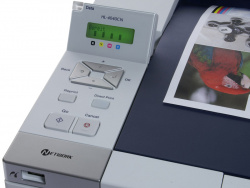
  • Back-lit display: yes
  • "Menu" button: no
  • Menu handling: simple
  • Readability and handling from a wheelchair: good
  • Cancel print button: yes
  • Labelling of buttons: comprehensible
  • Standard-Passwort: -


HP Color Laserjet CP2025n
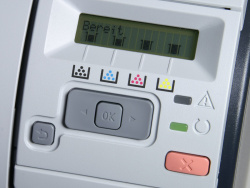
  • Back-lit display: no
  • "Menu" button: no
  • Menu handling: simple
  • Readability and handling from a wheelchair: good
  • Cancel print button: yes
  • Labelling of buttons: comprehensible
  • Standard-Passwort: -


Kyocera FS-C5100DN
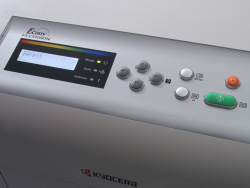
  • Back-lit display: yes
  • "Menu" button: yes
  • Menu handling: fair
  • Readability and handling from a wheelchair: bad
  • Cancel print button: yes
  • Labelling of buttons: comprehensible
  • Standard-Passwort: [fett {numbers of the printer´s name[fussnote {ID and password are the numbers in the printer´s name. E.g.: For the FS-C5100DN ID and password are "5100".}}

] ]


Oki C3600n
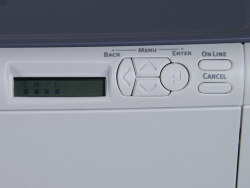
  • Back-lit display: no
  • "Menu" button: yes
  • Menu handling: simple
  • Readability and handling from a wheelchair: good
  • Cancel print button: yes
  • Labelling of buttons: comprehensible
  • Standard-Passwort: aaaaaa


Samsung CLP-610ND
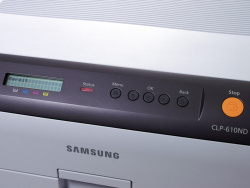
  • Back-lit display: no
  • "Menu" button: yes
  • Menu handling: simple
  • Readability and handling from a wheelchair: bad
  • Cancel print button: yes
  • Labelling of buttons: comprehensible
  • Standard-Passwort: -
Dieser Artikel wurde ohne generative KI erstellt.
26.02.09 11:33 (letzte Änderung)
1Middle class color laser professionals
2Druckerchannel Bottom Line
3Quick Overview
4Paper specifications
5Dirt collector Samsung
6Samsung´s Sauna
7Interfaces
8Physical dimensions
9The drivers
10Embedded webservers
11Environmental awards: Blauer Engel and Energy Star
12Vendor warranty
13Ergonomics: Use of the menu
14Ergonomics: Noise emission
15Ergonomics: Toner handling
16Consumables
17Lots of dust inside the Samsung
18Cost of print: Text
19Cost of print: Color
20Cost of print: Find out yourself
21Energy costs: Current consumption
22Quality of print in toner save mode
23Quality: Text print
24Quality: Graphics print
25Quality: Photo print
26Yellow Dots: The secret code
27Speed of print

5 Wertungen

 
1

Offenlegung - Provisionslinks

Wir erhalten bei einer Vermittlung zum Kauf oder direkt beim Klick eine Provision vom Anbieter.

Alle Preise enthalten die derzeit gültige MwSt. und verstehen sich zzgl. Versandkosten. Der Preis sowie die Verfügbarkeit können sich mittlerweile geändert haben. Weiß hinterlegte Preise gelten für ein baugleiches Gerät. Alle Angaben ohne Gewähr.

Forum Aktuell
12:12
10:42
10:10
06:59
10:15
Artikel
15.07. Drucker unter Windows 11: "Windows Ready Print" wird ab sofort priorisiert
10.07. Xerox B110, B105 und B115: Einfachste Monolaser mit Samsung-​Technik
09.07. ReadyPrint Flex: Epson prüft die Einführung neuer Tintenabos mit mehr Flexibilität und ohne Fixkosten
06.07. HP-​Verbrauchsmaterialien: Maßnahmen und Erfolge gegen Drittanbieter von Tinten-​ und Tonerkartuschen
01.07. Epson und "Windows Ready Print": Epson steht (zunächst) ohne Druckunterstützungs-​App da
30.06. Druckunterstützungs-​Apps (PSA) für "Windows Ready Print": Alles so schön bunt hier!
25.06. Ricoh ScanSnap Home: Softwareupdate für "ScanSnap Home" und Hardware-​OCR beim iX2500 freigeschaltet
23.06. Canon i-​Sensys MF275dw II, MF272dw II & LBP122dw II: Behutsames Facelift für die Monolaser-​Kompaktklasse
22.06. Xerox C200-​ und C300-​Serie (2026): Kombinierte Farblaser-​Einstiegsklasse von Lexmark und Xerox
16.06. Shrinkflation: Tintenpatronen-​Overkill
15.06. HP 302/304: Zusammenlegung geht bei 302er Tintenpatronen auf Kosten von Reichweite und Seitenpreis
12.06. Brother × Ricoh: "Strategische Allianz" ist nun auch in Europa angekommen
Beliebte Drucker
ab 598,49 €1 Epson Ecotank ET-8550

Multifunktionsdrucker, A3 (Tinte)

ab 149,99 €1 Canon Maxify MB5150

Multifunktionsdrucker (Pigmenttinte)

ab 352,96 €1 Epson Ecotank ET-4950

Multifunktionsdrucker (Tinte)

ab 680,00 €1 Epson Ecotank ET-5805

Multifunktionsdrucker (Pigmenttinte)

ab 322,98 €1 Epson Ecotank ET-3950

Multifunktionsdrucker (Tinte)

ab 329,00 €1 Canon Maxify GX4050

Multifunktionsdrucker (Pigmenttinte)

ab 71,38 €1 Canon Pixma TS705a

Drucker (Tinte)

ab 386,90 €1 Canon i-Sensys MF752Cdw II

Multifunktionsdrucker (Laser/LED)

ab 369,00 €1 HP Color Laserjet Pro MFP 3302fdwg

Multifunktionsdrucker (Laser/LED)

ab 295,76 €1 Brother MFC-J5010DW

Multifunktionsdrucker (Pigmenttinte)

Merkliste

×
Drucker vergleichen