1. DC
  2. Tests & Artikel
  3. Tintendrucker
  4. für Zuhause
  5. Drucker
  6. Canon Pixma iP4300 and Pixma iP3300
deen

Canon Pixma iP4300 and Pixma iP3300: Print quality and speed: Photoprint

von Frank Frommerübersetzt von Ulrich Junker
Hinweis: Für mindestens einen erwähnten Drucker ist der ausführliche Testbericht "Canons Allrounder in neuem Gewand" verfügbar.

We use 13 different files to test print speed and quality. On the following pages you find the most important ones.


DC test photo
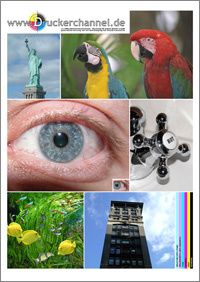
To test photo quality we print a standardized TIF-file. It´s 11.627 KByte in size (2.362 x 3.307 Pixels).

If you want to test your own printer, you can find a compressed JPG-version of this photo (see picture on the right side) in our Download-area. You also may write your own review.

We print our test photo on Canon´s Professional Photopaper (PR-101), with quality "high" in the driver for the print speed test, and in "manual quality mode 1" for quality.

Click the pictures below to look at them in their original size.
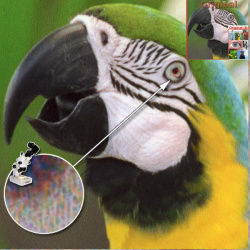
Unrivaled: It takes the iP4300 one Minute and 51 seconds to print out test photo. This is the same time it took the predecessor, iP5200.

The iP3300 isn´t that fast, but it´s still pretty swift: It needs two minutes and 48 seconds for our test print. That´s 40 seconds faster than the iP4200, predecessor to the iP4300. One reason for that are bigger droplets of ink.
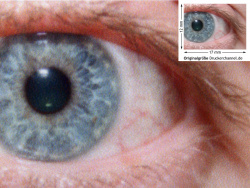
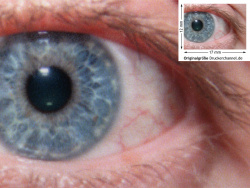
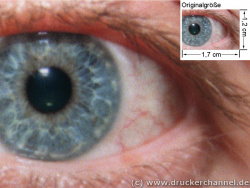
Due to tiny ink droplets of just one pl the print quality is excellent. The print raster is very fine, colors are neutral and natural.

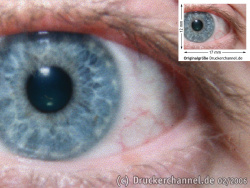
Print raster is more coarse with the cheaper iP3300, that´s due to the bigger ink droplets. Photos have less contrast, because the iP3300 has no photo black ink. The printer has to mix cyan, magenta, and yellow to produce black, the result is a somewhat brownish melange. The pigmented black ink (PGI-5BK) is unsuitable for photo print.

Canon Pixma iP3300Canon Pixma iP4300HP Deskjet 6980Epson Stylus D88
Print speed according to manufacturer17 pages per minute24 pages per minute27 pages per minute12 pages per minute
Print speed measured by DC for an A4-photo2:48 minutes1:51 minutes3:09 minutes7:36 minutes
Droplet size in Picoliters2 pl1 pl5 pl3pl
© Druckerchannel

Comparison: Photo print

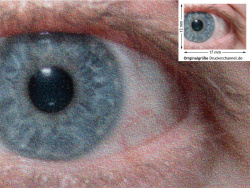
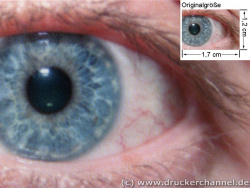
When you compare Canon´s new models with the competition you certainly will find the Canons´ advantages at first sight: Very small droplets. Within the field of business printers you will find (for the time being) the best photo print with the iP4300 and its predecessors, iP4200, iP5000 und iP5200.
Comparison: Previous models

Comparing the iP4200 and the iP5200 we found a yellow color cast in photos printed by the iP5200. Prints done by the iP4200 looked a little bit cold. The new iP4300 with the iP5200´s print head positions itself right in between them, and that means: Very good quality.
Dieser Artikel wurde ohne generative KI erstellt.
28.03.07 16:37 (letzte Änderung)
1New looks for an allrounder
2That´s what you get
3Outfit part I
4Outfit part II
5Ink cartridges
6Cost of print
7Print quality and speed: Photoprint
8Print quality and speed: Graphics print
9Print quality and speed: Text
10Smeartest and water resistance
Technische Daten

7 Wertungen

 
1

Offenlegung - Provisionslinks

Wir erhalten bei einer Vermittlung zum Kauf oder direkt beim Klick eine Provision vom Anbieter.

Alle Preise enthalten die derzeit gültige MwSt. und verstehen sich zzgl. Versandkosten. Der Preis sowie die Verfügbarkeit können sich mittlerweile geändert haben. Weiß hinterlegte Preise gelten für ein baugleiches Gerät. Alle Angaben ohne Gewähr.

Forum Aktuell
14:40
12:31
10:10
07:01
00:00
22:58
Artikel
26.02. WI506: Brother hat den wechselbaren Resttintenbehälter (wieder-​) entdeckt
23.02. Brother OAuth 2.0: Moderne E-​Mail-​Authentifizierung bei Brother-​Druckern
18.02. Brother MFC-​J5000DW-​Serie (2026): Leistungsfähige Bürotintendrucker bald auch in kompakt -​ ohne A3-​Funktion
12.02. Ricoh 300 SE-​Edition: Neue Mono-​ und Farblaser nun ohne WLAN und NFC
11.02. Windows Legacy Treiber v3/v4: Windows-​Update nimmt keine neuen Druckertreiber mehr auf
10.02. Mutoh-​Übernahme: Brother will unbedingt ins Großformat
06.02. 90 Jahre Ricoh: Jubiläum des Spezialisten für Kameras und Büromaschinen
05.02. Single-​Use printer cartridge ban: Los Angeles will Einweg-​Fremdpatronen für Drucker verbieten
26.01. Druckerauslieferungen IDC Q3/2025: Epson übernimmt von HP die Marktführerschaft bei Tintendruckern
23.01. Epson L5390, L3360, L3350, L3310 und L1350: Zeigen sich hier die neuen Einstiegs-​Ecotanks?
20.01. Brother ADS-​4550W: Dokumentenscanner mit Verpackungs-​Update
16.01. Epson "ReadyPrint MAX" mit Ecotank ET-​4950U: Selbst kaufen oder besser im Vollservice-​Abo?
Beliebte Drucker
Neu   Brother MFC-J5117DW

Multifunktionsdrucker (Pigmenttinte)

Neu   Brother MFC-J5010DW

Multifunktionsdrucker (Pigmenttinte)

Neu   Brother MFC-J5110DW

Multifunktionsdrucker (Pigmenttinte)

Neu   Oki C651dn

Drucker (Laser/LED)

ab 378,98 €1 Epson Ecotank ET-4950

Multifunktionsdrucker (Tinte)

ab 319,99 €1 Canon Maxify GX4050

Multifunktionsdrucker (Pigmenttinte)

ab 358,89 €1 Epson Ecotank ET-3950

Multifunktionsdrucker (Tinte)

ab 148,99 €1 Canon Maxify MB5150

Multifunktionsdrucker (Pigmenttinte)

ab 608,99 €1 Canon Maxify GX7150

Multifunktionsdrucker (Pigmenttinte)

ab 179,00 €1 Epson Ecotank ET-2871

Multifunktionsdrucker (Tinte)

Merkliste

×
Drucker vergleichen