1. DC
  2. Tests & Artikel
  3. Workshops
  4. Resttintenbehälter
  5. Workshop: Change Waste-Ink-Tank Canon Pixma iP4000
deen

Workshop Change Waste-Ink-Tank Canon Pixma iP4000: Panic - "Waste ink tank full"

von Frank Frommerübersetzt von Ulrich Junker
Seite

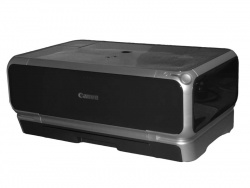
You are printing a lot with your Canon? All of a sudden you get a message: "Waste ink tank full", and your machine stops working. There´s no hint whatsoever in your manual, what to do about this. What next? Call customer service and pay as much as you payed for your printer do get the damned thing changed?

Hinweis: Für mindestens einen erwähnten Drucker ist der ausführliche Testbericht "Allrounder mit guter Ausstattung" sowie "Canons größter" sowie "Vielseitiger Fotodrucker" sowie "Konkurrenz für Sechsfarbdrucker" sowie "Neuer Stern am Druckerhimmel" verfügbar.

Read what comes next. With a little deftness you can change the waste ink collector yourself.

Ink-printers have to clean their print-heads from time to time, or they offer the user to see that it´s done.

Do you know where the printer puts the ink it uses to clean the heads? By and by lots of ink is going down the drain, and finally floats down to the printers bottom.

Editor Frank Frommer will show you now, how to change the waste ink collector for Canon PIXMA iP-printers and how to reset their respective counters.

We use a Canon Pixma iP4000 to show the procedure, but our instruction works with other models as well:

1Panic - "Waste ink tank full"
2Important: Loss of warranty and your own liability
3What´s a waste ink collector good for?
4Lifetime of a waste ink collector
5How to exchange sponges
6Step 1: Removing the printer´s sides
7Step 2: Removing the printer´s top
8Step 3: Removing the power supply
9Step 4: Lift the print engine
10Step 5: Reassembly
11Step 6: Reset the counter
Technische Daten

79 Wertungen

 
1

Offenlegung - Provisionslinks

Wir erhalten bei einer Vermittlung zum Kauf oder direkt beim Klick eine Provision vom Anbieter.

Alle Preise enthalten die derzeit gültige MwSt. und verstehen sich zzgl. Versandkosten. Der Preis sowie die Verfügbarkeit können sich mittlerweile geändert haben. Weiß hinterlegte Preise gelten für ein baugleiches Gerät. Alle Angaben ohne Gewähr.

Forum Aktuell
13:38
13:37
13:11
13:06
11:37
Artikel
25.06. Ricoh ScanSnap Home: Softwareupdate für "ScanSnap Home" und Hardware-​OCR beim iX2500 freigeschaltet
23.06. Canon i-​Sensys MF275dw II, MF272dw II & LBP122dw II: Behutsames Facelift für die Monolaser-​Kompaktklasse
22.06. Xerox C200-​ und C300-​Serie (2026): Kombinierte Farblaser-​Einstiegsklasse von Lexmark und Xerox
16.06. Shrinkflation: Tintenpatronen-​Overkill
15.06. HP 302/304: Zusammenlegung geht bei 302er Tintenpatronen auf Kosten von Reichweite und Seitenpreis
12.06. Brother × Ricoh: "Strategische Allianz" ist nun auch in Europa angekommen
11.06. Windows Ready Print: Microsoft macht Wechsel auf Mopria-​Druckertreiber umschaltbar
10.06. HOP vs. Epson-​Drucker: Erste zugelassene Klage wegen geplanter Obsoleszenz
09.06. Xerox 2026: Neues Markenimage mit gemeinsamem Logo
05.06. Brother MFC-​L8970CDW und HL-​L8570CDW: Farblaser-​Profiklasse mit 31 ipm
02.06. Epson Workforce DS-​71000WN und DS-​51000WN: Kommende Produktionsscanner mit Flachbett beenden CCD-​Ära
28.05. Brother MFC-​J6975DW und MFC-​J6977DW: Professionelle A3-​Tintendrucker mit besonders hoher Reichweite
Beliebte Drucker
Neu   Xerox C245

Multifunktionsdrucker (Laser/LED)

Neu   Xerox C303a

Multifunktionsdrucker (Laser/LED)

Neu   Xerox C305ae

Multifunktionsdrucker (Laser/LED)

Neu   Xerox XC2432

Multifunktionsdrucker (Laser/LED)

ab 359,00 €1 Epson Ecotank ET-4950

Multifunktionsdrucker (Tinte)

ab 152,99 €1 Canon Maxify MB5150

Multifunktionsdrucker (Pigmenttinte)

ab 634,50 €1 Epson Ecotank ET-8550

Multifunktionsdrucker, A3 (Tinte)

ab 333,00 €1 Epson Ecotank ET-3950

Multifunktionsdrucker (Tinte)

ab 329,99 €1 Canon Maxify GX4050

Multifunktionsdrucker (Pigmenttinte)

ab 72,99 €1 Canon Pixma TS7550i

Multifunktionsdrucker (Tinte)

Merkliste

×
Drucker vergleichen