1. DC
  2. Forum
  3. Tintendrucker
  4. Epson
  5. Epson Stylus C64
  6. Nach Patronenwechsel geht absolut nix mehr

Nach Patronenwechsel geht absolut nix mehr

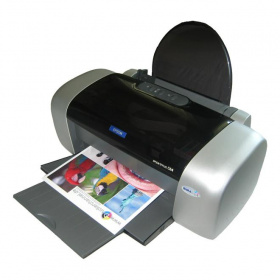
Epson Stylus C64Alt

Frage zum Epson Stylus C64

Drucker (Pigmenttinte) mit Drucker ohne Scanner, Farbe, Randlosdruck, nur USB, nur Simplexdruck, kompatibel mit T0441, T0452, T0453, T0454, 2003er Modell(mehr Daten)

Dieses Thema ist inaktiv: weitere Antworten sind nicht mehr möglich. Sie können jedoch ein neues Thema erstellen.

von
Ich hatte mir bei amazon so'n 4er-Set Patronen für meinen C64 betsellt. Da war von jeder Farbe eine Patrone drin. Hab' die dann ausgewechselt, als er nicht mehr wollte. Seitdem geht garnix mehr. Im Statusmonitor hat er angezeigt, dass alle Patronen voll waren, aber beim Drucken kam kein noch so kleines bisschen Farbe aufs Papier. Und das bei allen 4 Patronen.
In der Zwischenzeit habe ich nun schon so oft 'ne Druckkopfreinigung durchgeführt, dass er nun wieder der Meinung ist, die schwarze Patrone wäre leer.
Hab' mir heute mal 'ne kompatible Geha E68 geholt. Mit der funktioniert's genausowenig, weshalb ich mal 'n Problem mit den Patronen ausschließe.
Hat irgendjemand 'ne Ahnung, wo das Problem liegen könnte?

K
Beitrag wurde am 27.10.05, 20:17 Uhr vom Autor geändert.
von
Hallo,
schätze, der Kopf hat Luft gezogen. Fahr den Kopf so hin, dass du ihn leicht von Hand verschieben kannst. (Einschalten, Stecker raus)
Dann stellst du die höchste Stellung ein und legst feuchtes, saugfähiges Papier im Streifen von ca. 2-3 cm breite zwischen Kopf und Leiste. Dann saugt er, wenn du Glück hast, Tinte aus der(vollen) Patrone und die Luft ist weg.
Wenn du eine angefangene Patrone wieder raus nimmst, kann beim Wiedereinbau ein Luftpolster den Tintenfluss verhindern.
Das wäre eine von mehreren Möglichkeiten, die du mal probieren solltest.

Grüsse, Heinz
von
danke für den Tipp, aber das hat nicht viel gebracht. Vielleicht hab' ich auch nicht ganz verstanden, was du mit "höchste Stellung einstellen" meinst. Trotzdem danke.

K
von
Hello !

If it is so that you have an Epson of C or CX modell and it is running perfect before changing patrones but not after you must
first check that the tube assembling for headcleaning is in god condition* and also look at the terminalplate** before you are going to start a lot of cleaning.
*tube must be connected to the underside of terminalplate and not propped by ink and so on.
** The rubberlist round the plate must be intact,

To Frank i will say that he should add that to his artikel.I think that he can explain how to do that in german.
von
@ Larsas

You´re right, my C82 had the same problems and the reason was the tube

@ Frank

Du solltest das in der Tat in deinen Artikel mit aufnehmen, es ist beim C82 und co meistens der Schlauch, der sich gelöst hat...
von
Thank you Venom ST for your response .
I think that it is mostly on C80-82 it can be problem with the tubeassrembling .But I have got information that it CAN happen with all C and CX models from Maxpatchink.
So if you get problems after patronchanging always check tubeassembling before you try a lot of headcleanings and other cleaningsmethods.
On: www.maxpatchink.com/...

is an instruction to solv this problem.

If you cannot fix it, it is very tight, try to use your warranty or let somebody help !
I
Beitrag wurde am 09.11.05, 19:39 Uhr vom Autor geändert.
von
Thank you for this information. But I think Epson must try to control this Problem. For many users it will be impossible to solve this problem.
von
Yes, many users don't even know that there is something like a head cleaning unit in their printer.
von
Good morning
To seggel :I don t believe that Epson is going to take care of it without fight.
I self had long discussion with Epson Support before they accepted to repair my printer without any cost for me .My problems beginned in april with magenta that became streaky.
In july i lost every color after changing black .In september I discoverd the reason .But I could on two weeks not get magenta
perfekt.Two nozzles were still not open.
So I managed to get it fixed by Epson warranty.(Bought in april 2004) New printhead and new secured tubes were mounted.
To Frank: If they can follow your instructions they can at least
check this problem.With suitable tools it can be fixed by many.But they need to be informed about it and how to handle it.
To waste ink (original) without result is not so funny!!
von
@ Larsas:

YES! You´re right (again). What do you think, how is possible to solve the problem with the propped ink in the tube? My CX5200 (same Printhead like C82) had the problem, that ink is in the tube and I cannot clear it. Any ideas? I love my CX5200, because it was a very fast and cheap AIO, but now I print mostly with my Canon i990 and the prints arn´t water resistant...

@ Steps und Frank:
Das Problem mit der verstopften Leitung muss zu beheben sein. Ich warte mal, ob Larsas noch einen Tipp für mich hat, ansonsten versuche ich es auch mal mit einem Leser Artikel... Schande für Epson, dass aus solch lapidaren Gründen ein Spitzendrucker den Geist aufgibt, mein armer CX5200 ist vermutlich hin...
1

Offenlegung - Provisionslinks

Wir erhalten bei einer Vermittlung zum Kauf oder direkt beim Klick eine Provision vom Anbieter.

Alle Preise enthalten die derzeit gültige MwSt. und verstehen sich zzgl. Versandkosten. Der Preis sowie die Verfügbarkeit können sich mittlerweile geändert haben. Weiß hinterlegte Preise gelten für ein baugleiches Gerät. Alle Angaben ohne Gewähr.

Forum Aktuell
02:48
02:40
00:09
00:04
23:46
Artikel
26.01. Druckerauslieferungen IDC Q3/2025: Epson übernimmt von HP die Marktführerschaft bei Tintendruckern
23.01. Epson L5390, L3360, L3350, L3310 und L1350: Zeigen sich hier die neuen Einstiegs-​Ecotanks?
20.01. Brother ADS-​4550W: Dokumentenscanner mit Verpackungs-​Update
16.01. Epson "ReadyPrint MAX" mit Ecotank ET-​4950U: Selbst kaufen oder besser im Vollservice-​Abo?
13.01. Epson Expression Photo XP-​980: Multifunktions-​Fotodrucker mit A3-​Bypass
08.01. HP für Microsoft 365 Copilot: Umfassende KI-​Erweiterung für professionelle HP-​Multifunktionsdrucker
06.01. Canon Imageformula DR-​C350 und DR-​C340: Solide Dokumentenscanner-​Kompaktklasse
05.01. HP Smart Tank Cashback 2026: 20, 30 oder 50 Euro zurück für den Kauf eines HP Smart Tank
29.12. Epson und oAuth 2.0: Aktualisierung für aktuelle Workforce-​ und Ecotank-​Bürotintendrucker und Scanner
29.12. Xerox Dundalk: Irisches Werk für Tonerkartuschen schließt
15.12. Brother MFC-​J6000DW-​Serie 2026: Neue Bürotintendrucker bekommen doppelte Reichweite
11.12. Brother-​Tonerkartuschen: Erfolgreiche Klage gegen Fälschernetzwerk
Themen des Tages
Beliebte Drucker
Neu ab 424,00 €1 Brother ADS-4550W

Dokumentenscanner

ab 382,99 €1 Epson Ecotank ET-4950

Multifunktionsdrucker (Tinte)

ab 158,99 €1 Canon Maxify MB5150

Multifunktionsdrucker (Pigmenttinte)

ab 893,90 €1 Epson Ecotank ET-5850

Multifunktionsdrucker (Pigmenttinte)

ab 186,99 €1 Epson Ecotank ET-2870

Multifunktionsdrucker (Tinte)

ab 199,00 €1 HP Smart Tank 7008

Multifunktionsdrucker (Tinte)

ab 564,00 €1 Canon Maxify GX7150

Multifunktionsdrucker (Pigmenttinte)

ab 295,00 €1 Canon Maxify GX4050

Multifunktionsdrucker (Pigmenttinte)

ab 350,03 €1 Epson Ecotank ET-3950

Multifunktionsdrucker (Tinte)

ab 269,00 €1 Epson Ecotank ET-2951

Multifunktionsdrucker (Tinte)

Merkliste

×
Drucker vergleichen