1. DC
  2. Tests & Artikel
  3. Know-How
  4. Printer cleaning: How to clean Canon print heads
deen

Printer cleaning How to clean Canon print heads: Cleaning the print head
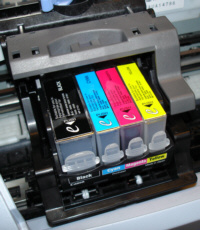
von Frank Frommerübersetzt von Ulrich Junker

At first I would try a deep cleaning ("Maintainance", Deep cleaning"). If this method shows no result after three or four tries, stop that: It uses a lot of expensive ink. Try something else.

Manual cleaning

If deep cleaning shows no results, clean the print head by hand.

CAUTION! Avoid spilling ink on your clothes, carpets, furniture. Ink spots are hard to remove.

For a manual cleaning, first remove the ink tanks, then the print head. Most printers have a grey lever which easily releases the print head.
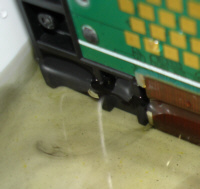

Now you need a plastic cup and distilled water. Put the print head into the water. It should not touch the metallic contacts. A few millimeters are sufficient. If you moisten the entire print head, it needs a lot (!) of drying time.

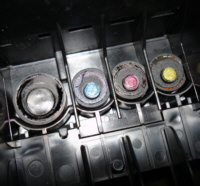
Now leave the print head alone for a couple of hours. Before that you can put some droplets of water on the print head´s topside (where ink gets into it).

You can perform the whole procedure with tap water as well. But you risk calcification, and your print head may get clogged by that. Distilled water will not do that.

When the print head is dry, install it in it´s place, and inserts the ink tanks. Complete the procedure with one to three cleaning cycles.

08.02.10 10:58 (letzte Änderung)
1White pages or bands - immediate cleaning is essential
2Cleaning the print head
3...no success yet...

4 Wertungen

 
1

Offenlegung - Provisionslinks

Wir erhalten bei einer Vermittlung zum Kauf oder direkt beim Klick eine Provision vom Anbieter.

Alle Preise enthalten die derzeit gültige MwSt. und verstehen sich zzgl. Versandkosten. Der Preis sowie die Verfügbarkeit können sich mittlerweile geändert haben. Weiß hinterlegte Preise gelten für ein baugleiches Gerät. Alle Angaben ohne Gewähr.

Forum Aktuell
11:03
10:47
10:41
10:31
10:10
Artikel
15.12. Brother MFC-​J6000DW-​Serie 2026: Neue Bürotintendrucker bekommen doppelte Reichweite
11.12. Brother-​Tonerkartuschen: Erfolgreiche Klage gegen Fälschernetzwerk
10.12. Ricoh IM Cxx01CE-​Serie: Aufbereitete A3-​Farbkopierer
03.12. Canon Zhongshan: Canon schließt chinesisches Werk für Laserdrucker
20.11. Ricoh Scansnap iX2400: Flinker USB-​Dokumentenscanner mit eng verzahntem Softwarepaket
11.11. Brother Connect: Treueprogramm mit Fünfjahresgarantie als Vorstufe zum Tintenabo
03.11. Konica Minolta bizhub 5021i, 5001i, 4221i und 4201i: Vier neue Monolaser für 42 oder 50 ipm
29.10. HP Envy Photo 7930-​ und 7230-​Serie: Fotodrucker mit Dreifarbpatrone
28.10. ETIRA zur EU-​Importgebühr: Verband begrüßt Gebühr für zollfreie Kleinstpakete, fordert aber weitere Maßnahmen
23.10. OKI 2026: Rascher Ausbau des Druckerportfolios geplant
20.10. HP Deskjet 4320-​ und 2920-​Serie: Einfachstdrucker im schwarzen Kleid
17.10. Oki B513dn und B433dn: Kompakte S/W-​Businessdrucker mit LED-​Technik
Themen des Tages
Beliebte Drucker
ab 186,99 €1 Canon Maxify MB5450

Multifunktionsdrucker (Pigmenttinte)

ab 863,90 €1 Epson Ecotank ET-5850

Multifunktionsdrucker (Pigmenttinte)

ab 163,90 €1 Epson Workforce Pro WF-4830DTWF

Multifunktionsdrucker (Pigmenttinte)

ab 354,99 €1 HP Color Laserjet Pro MFP 3302fdwg

Multifunktionsdrucker (Laser/LED)

ab 403,99 €1 Epson Ecotank ET-4950

Multifunktionsdrucker (Tinte)

ab 160,51 €1 Canon Maxify MB5150

Multifunktionsdrucker (Pigmenttinte)

ab 571,19 €1 Canon Maxify GX7150

Multifunktionsdrucker (Pigmenttinte)

ab 243,99 €1 Canon Maxify GX2050

Multifunktionsdrucker (Pigmenttinte)

ab 604,99 €1 Epson Ecotank ET-8550

Multifunktionsdrucker, A3 (Tinte)

ab 515,55 €1 Canon Maxify GX7050

Multifunktionsdrucker (Pigmenttinte)

Merkliste

×
Drucker vergleichen