1. DC
  2. Tests & Artikel
  3. Laserdrucker
  4. Farblaser
  5. Drucker
  6. Test Color laser: Samsung CLP-310n
deen

Test Color laser Samsung CLP-310n: Scope of supply

von Ulrich Junker
Hinweis: Für mindestens einen erwähnten Drucker ist der ausführliche Testbericht "Dampfmaschine mit Verletzungsgefahr" verfügbar.
Anzeige

Connenctions

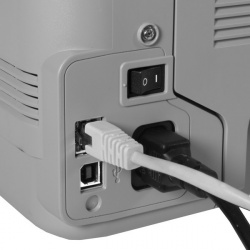
The CLP-310 and CLP-315 provide a USB port only, CLP-310N has an additional network connection, CLP-315W is connecting via network and Wlan.

The main difference between 310- and 315-models is their color (one grey, the other black housing) and additional memory in the Wlan version.

To the right you see the CLP-310N´s connections.


Paper handling
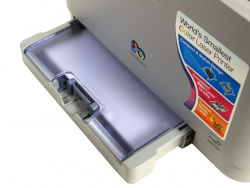
You can put up to 150 sheets into the paper tray. Maximum weight is 163 g/m², starting at 105 g/m² up however you have to insert them one after another, otherwise a jam is on the cards.

The paper output tray can accommodate 100 sheets only, what´s in the paper tray cannot be printed in one go.

Watch it, sharp edges

To insert a new stack of paper it is better to take out the paper tray completely. But watch your fingers: There are razor-sharp edges on the paper tray´s bottom (front left and right side).
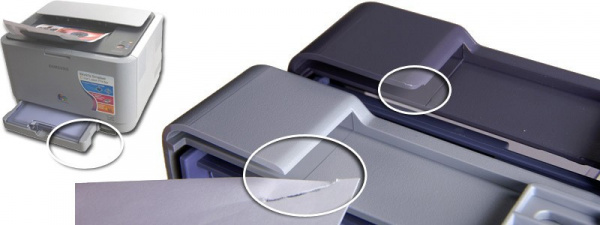

Single sheet paper feed

To print an overhead transparency you select this in the driver. After starting the print by pressing "OK" in the driver menu, you also have to press the "STOP" buttom on the printer to begin printing. No way to do that without consulting the manual before.


Control panel
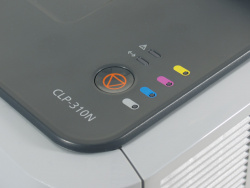
On the control panel you find four LEDs (to the right), which inform you roughly about the fill level of the toner cartridges.

The fat "STOP"-button (bottom left) cancels a print job, but also starts one using the manual feed.


Smoke signals
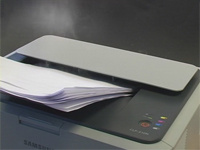
All models work without a fan, responsible for a low noise level. The top cover has a large surface area. The heat generated by the fuser unit starts an air flow, which is supposed to bleed off heat and humidity.

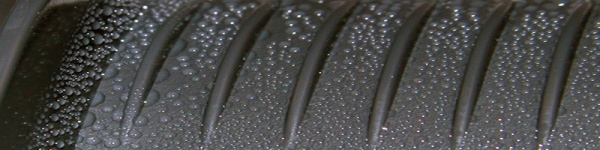
But if you use too damp a paper the printer turns into a steam engine. Large quantities of vapor are emitted, on the inside of the top cover vapor condenses in numerous droplets of water. The paper output is wet while and after printing (big picture below).

The manufacturer knows this. On the printer you find a sticker, telling you: "Damp paper may cause water vapor, but harmless to humans and to the product."
Dieser Artikel wurde ohne generative KI erstellt.
08.10.08 10:18 (letzte Änderung)
1Steam-engine with risk of injury
2Scope of supply
3Consumables
4Cost of print
5Quality and speed: Color print
6Quality and speed: Graphics print
7Duplexprint, registration
8Quality and speed: Text print
9Video: How a transfer unit works
Technische Daten

6 Wertungen

 
1

Offenlegung - Provisionslinks

Wir erhalten bei einer Vermittlung zum Kauf oder direkt beim Klick eine Provision vom Anbieter.

Alle Preise enthalten die derzeit gültige MwSt. und verstehen sich zzgl. Versandkosten. Der Preis sowie die Verfügbarkeit können sich mittlerweile geändert haben. Weiß hinterlegte Preise gelten für ein baugleiches Gerät. Alle Angaben ohne Gewähr.

Forum Aktuell
19:51
19:32
19:29
19:22
19:14
12:15
Artikel
26.02. WI506: Brother hat den wechselbaren Resttintenbehälter (wieder-​) entdeckt
23.02. Brother OAuth 2.0: Moderne E-​Mail-​Authentifizierung bei Brother-​Druckern
18.02. Brother MFC-​J5000DW-​Serie (2026): Leistungsfähige Bürotintendrucker bald auch in kompakt -​ ohne A3-​Funktion
12.02. Ricoh 300 SE-​Edition: Neue Mono-​ und Farblaser nun ohne WLAN und NFC
11.02. Windows Legacy Treiber v3/v4: Windows-​Update nimmt keine neuen Druckertreiber mehr auf
10.02. Mutoh-​Übernahme: Brother will unbedingt ins Großformat
06.02. 90 Jahre Ricoh: Jubiläum des Spezialisten für Kameras und Büromaschinen
05.02. Single-​Use printer cartridge ban: Los Angeles will Einweg-​Fremdpatronen für Drucker verbieten
26.01. Druckerauslieferungen IDC Q3/2025: Epson übernimmt von HP die Marktführerschaft bei Tintendruckern
23.01. Epson L5390, L3360, L3350, L3310 und L1350: Zeigen sich hier die neuen Einstiegs-​Ecotanks?
20.01. Brother ADS-​4550W: Dokumentenscanner mit Verpackungs-​Update
16.01. Epson "ReadyPrint MAX" mit Ecotank ET-​4950U: Selbst kaufen oder besser im Vollservice-​Abo?
Beliebte Drucker
Neu   Brother MFC-J5117DW

Multifunktionsdrucker (Pigmenttinte)

Neu   Canon i-Sensys MF563dw

S/W-Multifunktionsdrucker (Laser/LED)

Neu   Canon Imageforce 1643

S/W-Multifunktionsdrucker (Laser/LED)

Neu   Canon i-Sensys LBP335dw

S/W-Drucker (Laser/LED)

ab 364,99 €1 Epson Ecotank ET-4950

Multifunktionsdrucker (Tinte)

ab 395,00 €1 Canon Maxify GX6550

Multifunktionsdrucker (Pigmenttinte)

ab 148,99 €1 Canon Maxify MB5150

Multifunktionsdrucker (Pigmenttinte)

  Brother MFC-J5010DW

Multifunktionsdrucker (Pigmenttinte)

ab 319,99 €1 Canon Maxify GX4050

Multifunktionsdrucker (Pigmenttinte)

ab 188,79 €1 Brother DCP-T580DW

Multifunktionsdrucker (Tinte)

Merkliste

×
Drucker vergleichen