

Know-How HP Officejet Pro 8500's Hidden Service Menu: Menu structures
The main menu
- MFG
- REFLASH
- AUDIT
- MENU
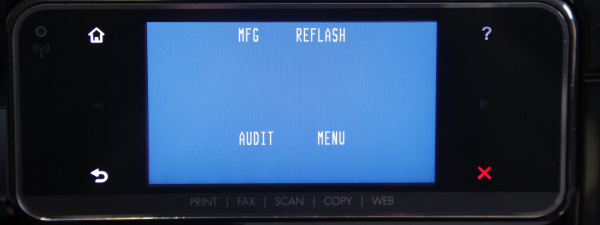

The MFG menu (Manufacturing-Menu)
In this section, only a grid appears. If you push the Off button, the printer reboots with a message saying "MFG-mode". If you know anything about this mode we would appreciate you sending us an email to info@druckerchannel.de or posting in our forums, if you have more information on the topic.
The REFLASH Menu
A green screen showing the numbers "1 2 3 4 5" appears. We believe that this rewrites the flash memory to correct possible memory bugs. Afterwards you can only switch the printer off - it immediately reboots and starts a thorough printhead cleaning process.
The AUDIT Menu
A pink screen showing "AUDIT" appears. Turning off the printer will make it reboot in "AUDIT-mode". If you have more information on this mode, we would appreciate an email to info@druckerchannel.de or a post in our forums.
The MENU Menu
- PARTIAL RESET: Resets country- and user configuration.
- SEMI-RESET: ???
- FULL-RESET: ???
- OOB-RESET: Out-Of-Box-Reset - resets the printer to the setting it was bought in.
- FORCE USER MODE: ???
- NO PRINT MECH: Printer boots. All functions (excluding printing) are deactivated. Printjobs get canceled automatically without error message.
- NO SCAN MODE: Printer boots. All functions (excluding scanning) are deactivated. Scanning and copying is not possible in this mode.
- NO SCAN NO MECH: Printer boots in "No Any Mech" mode. All mechanical functions (scanning and printing) are deaktivated.
- CLEAR DERIV: Printer boots - several configuartions such as country and eprint configs get deleted.
- MEM INIT ONLY: ???
- SAFE LOAD: ???
- NO FW UPDATE: The printer boots - It is now possible to manually update the printer's firmware from your computer. This is probably used to stop the Officejet from doing updates automatically.
- NORMAL OFF W IO ONCE: ???
Menu structure of the Engineering/Support menu
If the printer is turned off and you press the non-flashing "back" sensor button four times you get back to the Engineering/Support menu.
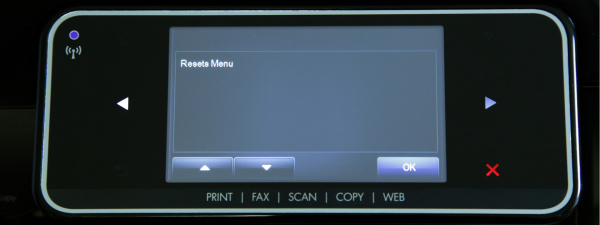
- Support: Shows the current firmware version - for example LRP1FN1126AR.
- Information Menu:
- info menu (displays serial number)
- model number: displays model number - for example "Officejet Pro 8500 A910" and ID.
- serial number: displays serial number
- IK Lookup: ???
- region/language: region and language - for example "germany/german"
- counters: displays printed pages and "cycles"
- firmware version: displays firmware version
- event log: ??? numerical display of ten events
- assert history: ???
- printer region: ???
- pen supply region: display of a "registration number" for cyan, magenta, yellow and black - pen supply serial number (SN): displays serial numbers of cyan, magenta, yellow and black
- pen supply level of ink (LOI): shows cartidge ink levels - for example "low on ink"
- relocks remaining: ??? displays number of remaining possible "relocks"
- relock attemps remaining: ??? displays number of remaining possible "relock attempts"
- gather/scrample Scheme: ???
- checksum for relock data input: ???
- NHIO: ???
- IEO: ???
- IRO: ???
- wireless region: ??? - Resets Menu:
- Country/Language Reset: resets country and language settings
- Partial Reset: resets country, language and alle user settings
- Semi-Full-Reset: ??? - System Configuration Menu:
- hardware failure status: displays errors with the possibility of deleting error messages.
- ink initialization status: ??? possibility to choose between "clear" or "set"
- set boot mode to user mode: ??? - Fax Diagnostic Menu:
- Run Fax Test
- Save Fax Settings
- Restore Fax Settings Reset Fax Params
- Change Fax Param
- Fax Param Report
- Fax Trace Report
- Speaker Mode
- Ring Monitor
- CNG Monitor
- Signal Power - Print Diagnostic Menu:
- nozzle test
- bypass pen alignment - Connectivity Diagnostics Menu:
- connectivity report
- enable disable network
- wireless search sound toggle
- wireless diagnostic test - Reports Menu:
- Print Status report
- extended selftest
- PQ Diagnostic report
- print-mech button tap
- config report
- fax trace
- counter - Scan Diagnostic Menu:
- test scan motor
- scanner modul test - Photo Menu:
- Mass storage Enable/Disable - Enable/Disable Menu:
- Fax Enable/Disable


