1. DC
  2. Tests & Artikel
  3. Workshops
  4. Resttintenbehälter
  5. Workshop: Replace waste ink tanks of Epson C & D-models
deen

Workshop Replace waste ink tanks of Epson C & D-models: Step 4: Get access to another screw

von Frank Frommerübersetzt von Ulrich Junker
Hinweis: Für mindestens einen erwähnten Drucker ist der ausführliche Testbericht "Zwei langsame Office-Drucker der Einsteigerklasse" sowie "Guter Drucker für den Hausgebrauch" sowie "Powermaschine" verfügbar.

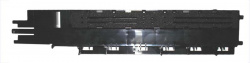
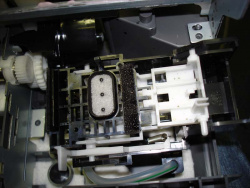
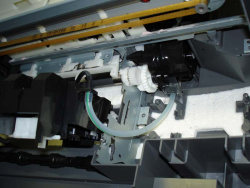
To get access to another screw, you must remove the silver front rail (see picture) and the plate with the sponge that absorbs the ink during borderless printing.
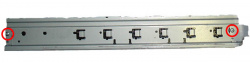
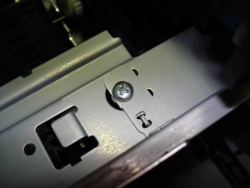
Remove both screws and carefully lift the silver bar.
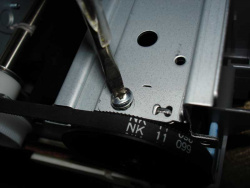
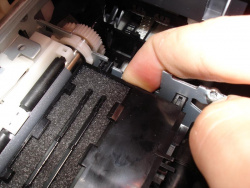
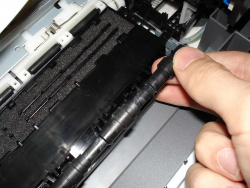
Now remove the screw on the left side, which secures the black plate. Then you can remove this plate by lifting it slightly, then press it out of it´s holder on the right side. Finally unclip the black rod.
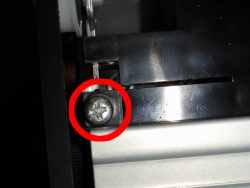
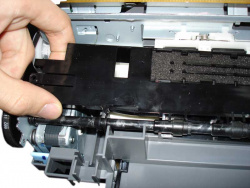
After this is done, you can already see parts of the waste ink pads. The cleaning unit on the right side can be taken out by pulling firmly. It is not bolted to the printer housing, just clicked into it´s place.
09.06.11 15:26 (letzte Änderung)
1Diaper change: Epson Stylus models
2Important: Loss of warranty and your own liability
3What´s a waste ink collector good for?
4Lifetime of a waste ink collector
5How to replace the sponges
6Step 1: Remove the side covers
7Step 2: Remove center of housing
8Step 1 & 2 for Epson Stylus D68
9Step 3: Remove front cover and paper output tray
10Step 4: Get access to another screw
11Step 5: Lift the printing unit
12Step 6: Reassembly
13Step 7: Counter reset
Technische Daten

4 Wertungen

 
1

Offenlegung - Provisionslinks

Wir erhalten bei einer Vermittlung zum Kauf oder direkt beim Klick eine Provision vom Anbieter.

Alle Preise enthalten die derzeit gültige MwSt. und verstehen sich zzgl. Versandkosten. Der Preis sowie die Verfügbarkeit können sich mittlerweile geändert haben. Weiß hinterlegte Preise gelten für ein baugleiches Gerät. Alle Angaben ohne Gewähr.

Forum Aktuell
13:31
13:26
11:28
10:54
10:46
Artikel
03.12. Canon Zhongshan: Canon schließt chinesisches Werk für Laserdrucker
20.11. Ricoh Scansnap iX2400: Flinker USB-​Dokumentenscanner mit eng verzahntem Softwarepaket
11.11. Brother Connect: Treueprogramm mit Fünfjahresgarantie als Vorstufe zum Tintenabo
03.11. Konica Minolta bizhub 5021i, 5001i, 4221i und 4201i: Vier neue Monolaser für 42 oder 50 ipm
29.10. HP Envy Photo 7930-​ und 7230-​Serie: Fotodrucker mit Dreifarbpatrone
28.10. ETIRA zur EU-​Importgebühr: Verband begrüßt Gebühr für zollfreie Kleinstpakete, fordert aber weitere Maßnahmen
23.10. OKI 2026: Rascher Ausbau des Druckerportfolios geplant
20.10. HP Deskjet 4320-​ und 2920-​Serie: Einfachstdrucker im schwarzen Kleid
17.10. Oki B513dn und B433dn: Kompakte S/W-​Businessdrucker mit LED-​Technik
16.10. Canon Scanner-​Cashback 2025: 20, 30 oder 40 Euro für den Kauf eines Dokumentenscanners
15.10. Canon Drucker-​Cashback 2025: Bis zu 100 Euro Rückerstattung für Maxify-​Drucker und Monolaser
13.10. HP Envy, Deskjet & Officejet ("e"-​Modelle): Schluss mit HP+ nun auch bei Tintendruckern
Themen des Tages
Beliebte Drucker
ab 160,89 €1 Canon Maxify MB5150

Multifunktionsdrucker (Pigmenttinte)

ab 284,99 €1 Canon Maxify GX4050

Multifunktionsdrucker (Pigmenttinte)

ab 243,90 €1 Canon Maxify GX2050

Multifunktionsdrucker (Pigmenttinte)

ab 516,89 €1 Canon Maxify GX7050

Multifunktionsdrucker (Pigmenttinte)

ab 367,11 €1 Epson Ecotank ET-3950

Multifunktionsdrucker (Tinte)

ab 259,90 €1 Brother DCP-T780DW

Multifunktionsdrucker (Tinte)

ab 571,19 €1 Canon Maxify GX7150

Multifunktionsdrucker (Pigmenttinte)

ab 369,98 €1 Canon i-Sensys MF667Cdw

Multifunktionsdrucker (Laser/LED)

ab 419,98 €1 Epson Ecotank ET-4950

Multifunktionsdrucker (Tinte)

ab 598,90 €1 Epson Ecotank ET-8550

Multifunktionsdrucker, A3 (Tinte)

Merkliste

×
Drucker vergleichen